
Create a Workout
This video is hosted on YouTube and requires cookies to view.
YouTube Privacy PolicyVekta uses your session Title and Description to automatically generate a structured Workout in seconds. When you describe a Workout in plain text, Vekta builds the Workout with intervals and syncs it to your athlete’s device immediately.
You can create workouts for:
Cycling: Based on Critical Power (CP) or Heart Rate.
Running: Based on Critical Pace or Heart Rate.
Requirements
To use the AI Workout Builder, your profile must be set up with the following information:
For Cycling
To use Power or Custom Zones: The athlete must have at least 30 rides with power data synced. Vekta uses these to automatically calculate Critical Power (CP) .
To use Heart Rate: Ensure the Max Cycling Heart Rate is manually entered in the profile.
For Running
To use Critical Pace or Custom Pace Zones: Manually enter Critical Pace in the athlete's Profile.
To use Heart Rate: Manually enter Max Running Heart Rate in the athlete's profile.
Every workout is made up of intervals (such as a warm-up, a hard effort, or a recovery interval). For each interval, you can tell Vekta:
1. How long the interval should last
You can define the length of the interval by:
Time: (e.g., 5 minutes)
Distance: (e.g., 1 km or 400m)
Lap Button: The interval stays active until you manually press the lap button on your device.
2. Intensity
Describe the target effort using:
For Cycling workouts:
Power: Set a specific watt range (eg, 200W) or a percentage of your CP (eg, 80% CP), or training zone.
Heart Rate: Set a specific HR range, percentage of your Max HR, or Heart rate zone.
For Run Workouts:
Pace: Set a specific pace or a percentage of Critical Pace (eg, 95% CS) or zone.
Heart Rate: Set a specific HR, percentage of Max Heart Rate, or Heart Rate zone.
3. Extra targets
Cadence: Add a target cadence if cadence is the focus of the session.
Heart Rate Cap: Add a limit to a power or pace interval based on the HR range you want the athlete to be in (eg, "10 mins at threshold but don't go above a HR of 170 bpm").
Examples - Cycling Workouts
Here are a few ways you can describe sessions that generate structured outputs:
1. Using Zones
3-Hour Ride with Anaerobic Efforts:
1h30 aerobic, followed by 6 x 30-second anaerobic intervals with 4'30 recovery, 1h aerobic.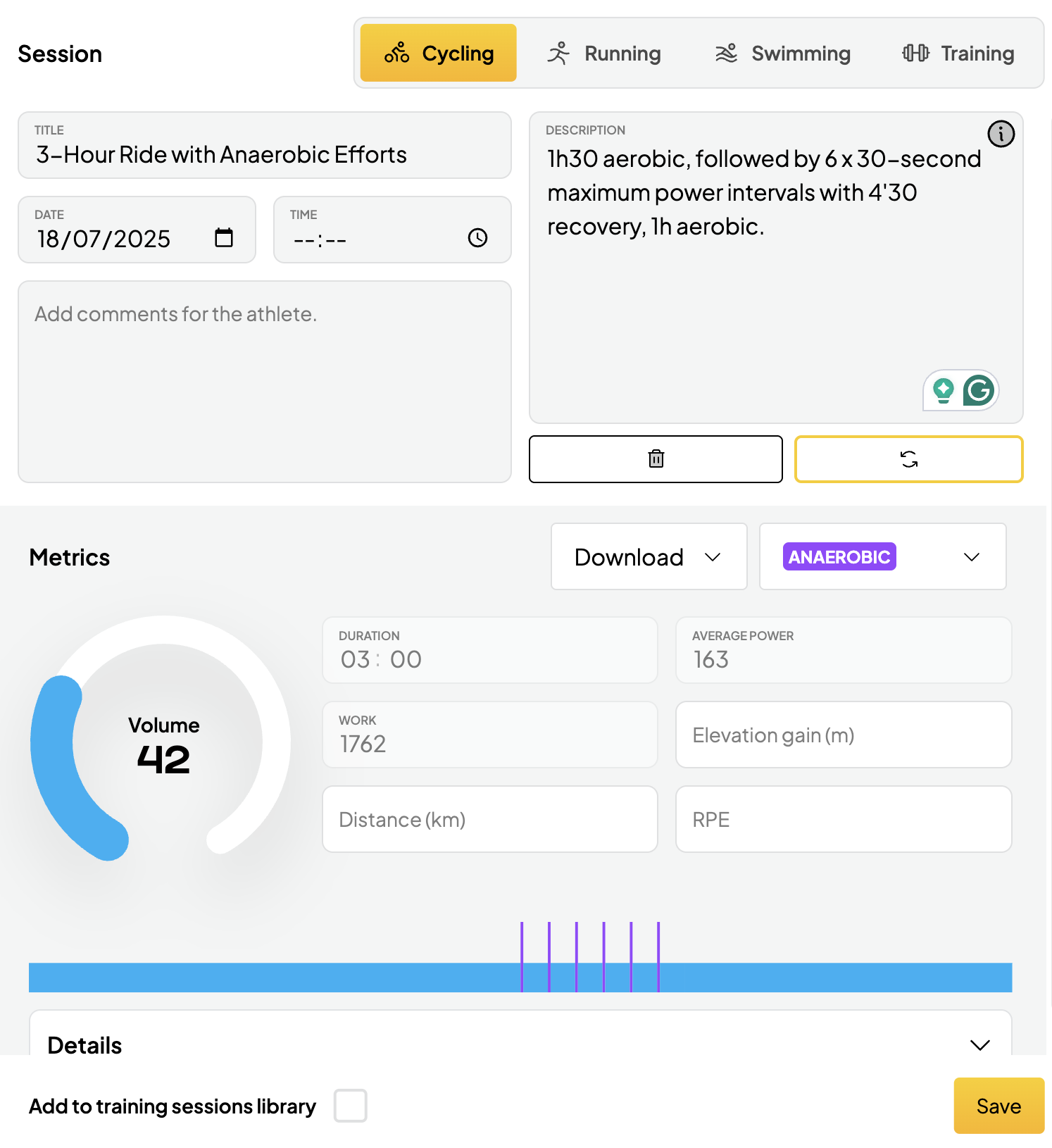
2. Using % CP
1h30 Over-Under Intervals:
15-minute warm-up, then 6 x 5-minute over-under intervals (2 minutes at 105% CP, 3 minutes at 90% CP) with 5-minute recoveries; 15-minute cool-down.
3. Using Power values
3h Lactate Clearance including 2 x (4 x (1min 500w into 4min 300w) - 20 min recovery)4. Nested Structure (Max Depth of 2)
1h HIIT Session:
20-minute warm-up, followed by 2 x (5 x 1-minute VO2max intervals with 1-minute recovery) and 5-minute recovery between sets, ending with a 10-minute cool-down.
5. Critical Power Test
CP Test:
Start with a 20-minute warm-up, then perform a 15" max sprint, followed by a 20-minute recovery. Next, do 5 min max, 30 minutes of easy pedaling, and a 20' max effort.
Finish with a 20-minute cool down.
7. Including Cadence Target
Low Cadence:
3h Aerobic with Low-Cadence Work: Include 3 x 10min at threshold < 60 rpm.
8. Including HR Target
2h Steady Zone 2 ride:
HR capped at 145 bpm.
9. Using Heart Rate Zones
Recovery spin:
45-minute Aerobic
10. Using % Max HR
Threshold:
20m warm up, then 3 x 10 minutes at 88-92% Max HR with 5m easy recovery between sets, 10m cool down.
Examples - Run Workouts
11. Using Heart Rate Zones
Aerobic Capacity:
45-minute steady run at Zone 2 Heart Rate.
12. Using Pace
Lactate Threshold:
15m warm up, then 5 x 1km at 4:15 min/km pace with 2m recovery, 10m cool down.
13. Using Pace Zones
Neuromuscular Efficiency:
15m warm up, then 12 x 20 seconds at Zone 6 Pace with 90s walking recovery, 10m cool down.
14. Using % Critical Pace
VO2 Max:
15m warm up, then 6 x 3 minutes at 105% Critical Pace with 3m jog recovery, 10m cool down.